In this post, you will learn how to sum multiple columns in R using the data.table package. For example, we may have several columns containing test scores and want to calculate the sum of these scores for each participant.
In previous posts, we looked at how to sum columns using dplyr and base R. Here, we will use data.table to do the same thing. First, we will look at how to sum multiple columns. Next, we will see how to calculate sums by group. Finally, we will use the %in% operator to select columns when calculating sums.
How to Sum Multiple Columns in data.table
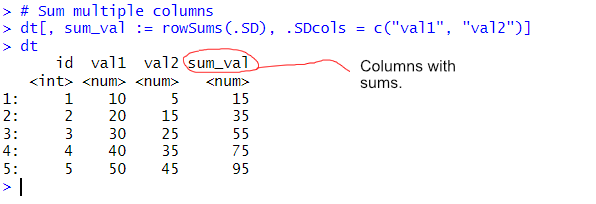
To sum multiple columns in data.table, we use the .SDcols argument to specify which columns to sum. Here is an example:
library(data.table)

# Create a sample data.table
dt <- data.table(id = 1:5, val1 = c(10, 20, 30, 40, 50), val2 = c(5, 15, 25, 35, 45))

# Sum multiple columns
dt[, sum_val := rowSums(.SD), .SDcols = c("val1", "val2")]Code language: HTML, XML (xml)
In the code chunk above, we created a data.table with two numerical columns (val1 and val2). We then used rowSums(.SD) to sum these columns row-wise, storing the result in a new column called sum_val. The .SDcols argument specifies which columns to include in the sum.
Sum Multiple Columns in data.table by Group
Often, we need to sum multiple columns within groups. We can achieve this using the by argument in data.table.
# Create a sample data.table with groups
dt <- data.table(group = c("A", "A", "B", "B", "B"), val1 = c(10, 20, 30, 40, 50), val2 = c(5, 15, 25, 35, 45))

# Sum multiple columns by group
dt[, .(sum_val1 = sum(val1), sum_val2 = sum(val2)), by = group]Code language: PHP (php)
In the code chunk above, we grouped the data.table by the group column and summed val1 and val2 separately for each group. This is useful when working with categorized data.

Using %in% to Select Columns for Summation
Another way to dynamically select columns for summation is by using the %in% operator.
# Define columns to sum
cols_to_sum <- c("val1", "val2")

# Sum using %in%
dt[, sum_val := rowSums(.SD), .SDcols = names(dt) %in% cols_to_sum]Code language: PHP (php)
In the code chunk above, we created a vector of column names (cols_to_sum) that we wanted to sum. The .SDcols = names(dt) %in% cols_to_sum dynamically selects only those columns present in cols_to_sum. See a previous post for more about selecting columns from a data.table.
Summary
In this post, you learned how to sum multiple columns in R using data.table. We looked at how to calculate sums across rows and how to sum columns for different groups.
We also used .SDcols to select the columns we wanted to work with and by to calculate sums for each group. Finally, we looked at how to use the %in% operator to select columns based on their names.
As you have seen, there are several ways to sum multiple columns using data.table. Which method you use depends on whether you want to calculate a sum for each row, each column, or each group in your dataset.
I hope you found this tutorial helpful. If you have any questions or know another way to sum multiple columns in R, please leave a comment below. Also, if you found this post useful, feel free to share it with others who might be interested in working with data.table in R.