When working with data in R, we sometimes need to combine two datasets. For example, we may have collected data from two different groups of participants or conducted the same experiment on two occasions. Instead of working with two separate datasets, we can combine them into a single data table.
In this post, you will learn how to combine two data tables in R using the data.table package. We will start by using rbind() to merge two data tables that have the same columns. Next, we will use rbindlist() to do the same thing. Finally, we will look at how to combine data tables when the column names differ.
Let’s start by creating two data tables for our examples.
Creating Two Data Tables in R
Before we combine our data tables, we need some data to work with. For this tutorial, we will create two small datasets containing participant IDs, group membership, and test scores.
Let’s start by loading the data.table package and create our two data tables:
library(data.table)
dt1 <- data.table( participant = 1:3, group = c("A", "A", "A"), score = c(12, 15, 14) )

dt2 <- data.table( participant = 4:6, group = c("B", "B", "B"), score = c(16, 13, 18) )Code language: JavaScript (javascript)
In the code above, we first loaded the data.table package. Next, we created two data tables using the data.table() function. Both tables contain three columns: participant, group, and score. The first table contains data from Group A, whereas the second contains data from Group B.
Now that we have our data, we can combine the two data tables in R.
How to Combine Two Data Tables in R Using rbind()
One way to combine two data tables in R is to use the rbind() function. This function lets us add rows from one data table to another.
For example, we can use rbind() when we have collected data from two groups and want to work with all participants in the same dataset.
Here is how to combine our two data tables using rbind():
combined_dt <- rbind(dt1, dt2)

combined_dt
In the code above, we used rbind() to combine dt1 and dt2. That is, we added the rows from the second data table below the rows from the first.
We then saved the result in a new data table called combined_dt.
Our new data table contains six rows and three columns:
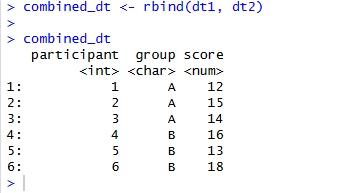
As you can see, we now have all six participants in one data table. We can use this combined dataset for further analysis. In this example, both data tables have the same column names and compatible data types. If the columns differ, we may need another approach, which we cover later in this tutorial.
Combining Two Data Tables Using rbindlist()
Another way to combine two data tables in R is to use the rbindlist() function from the data.table package.
Unlike rbind(), rbindlist() takes a list of data tables as its input. This can be useful when we want to combine several data tables into one.
Here is how to use rbindlist() with our example data:
combined_dt <- rbindlist(list(dt1, dt2))Code language: PHP (php)In the code above, we first created a list containing our two data tables using list(). Next, we passed this list to rbindlist(). The function then combined the rows from both tables into one data table. As you can see, we get the same result as in the previous example using rbind(). One advantage of rbindlist() is that we can easily combine more than two data tables. For example, if we had collected data from three or four groups, we could include all the tables in the list.
We can also use rbindlist() when our data tables do not contain exactly the same columns, as we will see next.
How to Combine Data Tables with Different Columns in R
Sometimes, the data tables we want to merge do not have the same columns. For example, we may have collected age information from one group but not from another. If we try to combine these tables without accounting for the difference, we may get an error. Fortunately, we can use rbindlist() with the fill = TRUE argument to combine data tables with different columns.
First, let’s create a new data table containing an additional variable:
dt3 <- data.table(
  participant = 7:9, group = c("C", "C", "C"),
  score = c(17, 19, 16), age = c(25, 30, 28)
  )Code language: R (r)
In the code above, we created a third data table called dt3. This table contains the same three columns as our previous tables, but we also added an age column.
Now, let’s merge dt1 and dt3:
combined_dt <- rbindlist(
  list(dt1, dt3),
  use.names = TRUE, fill = TRUE
  )Code language: R (r)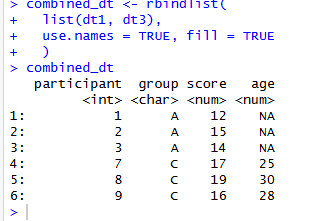
As you can see, the participants from Group A have NA in the age column because this information was not available in dt1. This approach is useful when we want to combine datasets containing slightly different variables.
However, note that fill = TRUE does not automatically identify columns that represent the same variable but have different names. For example, if one table contains score and another contains test_score, these will be treated as separate columns unless we rename them first.
Adding a Column to Identify the Original Data Table
When combining data tables in R, we may also want to keep track of which table each observation came from. For example, we may have collected data at two different time points or from two different studies. We can do this using the idcol argument in rbindlist().
Here is how to add a column identifying the original data table:
combined_dt <- rbindlist(
  list(Study1 = dt1,
        Study2 = dt2
        ),
  idcol = "study"
  )Code language: R (r)
In the code above, we first created a named list containing our two data tables. We named the first table Study1 and the second Study2. Next, we used idcol = "study" to add a new column to our combined data table. This column tells us which table each row came from.
Here is the result:
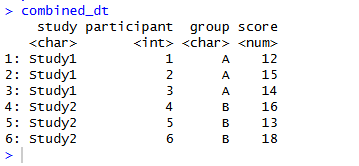
As you can see, we now have an additional column called study. This makes it easier to identify the original dataset for each observation. For example, we can use this column to compare results between studies or examine data from different collection periods.
rbind() vs. rbindlist() in R
So far, we have looked at two ways to combine data tables in R. Both rbind() and rbindlist() can be used to add rows from one data table to another, but there are some differences. The rbind() function is useful when we have two data tables with the same columns and want to combine them. On the other hand, rbindlist() is particularly useful when we have several data tables stored in a list. It also provides arguments such as fill and idcol, which make it easier to work with tables containing different columns or to identify where observations came from.
For example, if we have two tables with the same columns, we can simply use:
combined_dt <- rbind(dt1, dt2)If we have several tables, or want to add a column identifying the original dataset, we can use:
combined_dt <- rbindlist(
  list(
    Study1 = dt1, Study2 = dt2
    ), idcol = "study"
  )Code language: HTML, XML (xml)
Which function we use depends on how our data is organized and what we want to do with the combined dataset.
Conclusion
In this post, you learned how to combine two data tables in R using rbind() and rbindlist(). First, we created two data tables and used rbind() to combine their rows. Next, we used rbindlist() to get the same result. We also looked at how to combine data tables with different columns using fill = TRUE. Finally, we used the idcol argument to add a column identifying the original data table. As you have seen, both rbind() and rbindlist() are useful when we want to combine data from different groups, studies, or time points. If your data tables have the same columns, rbind() is a straightforward option. If you are working with several tables or need more flexibility, rbindlist() may be a better choice.
I hope you found this tutorial helpful. If you have any questions or suggestions, please leave a comment below. Also, if you found this post useful, feel free to share it with others who might be interested in working with data.table in R.
More data.table Tutorials in R
If you want to learn more about working with data.table in R, I have written several other tutorials on the topic. For example, you can learn how to count rows, rename columns, and work with missing values.
Here are some more data.table tutorials you may find useful: