How to Add an Empty Column to a Dataframe in R (with tibble)

How do I add an empty column in R?

In this short R tutorial, you will learn how to add an empty column to a dataframe in R. Specifically, you will learn 1) to add an empty column using base R, 2) to add an empty column using the add_column function from the package tibble and we are going to use a pipe (from dplyr). Now, dplyr comes with many handy functions that, apart from adding columns, make it easy to remove a column from the R dataframe (e.g., using the select() function). Both tibble and dplyr are part of the tidyverse package. 

The outline of this post is as follows:

  1. Reading Data from an Excel File
  2. How to Add an Empty Column to the Dataframe with:
    • Base R
    • add_column()
  3. How to Add Multiple Empty Columns with:
    • Base R
    • add_column()

Read more

How to Convert JSON to Excel in Python with Pandas

In this Pandas tutorial, we will learn how to export JSON to Excel in Python. This guide will cover four simple steps to use Python’s json module, the Python package requests, and Pandas.

Outline

The structure of this tutorial is as follows. The first section will look at a basic example of converting JSON to an Excel file with Pandas and Python. After we have seen and briefly learned the syntax, we will continue with a section covering some examples of when this knowledge may be useful. In the third section, we will look at the prerequisites of this Python tutorial and how to install Pandas. After we are sure we have everything needed, we will go through four steps on how to save JSON to Excel in Python. Here, we will start by reading the JSON file from the hard drive and saving it as an Excel file. Furthermore, we will also look at an example when reading JSON from a URL and saving it as a .xlsx file. Finally, we will also use the Python package JSON to Excel converter.

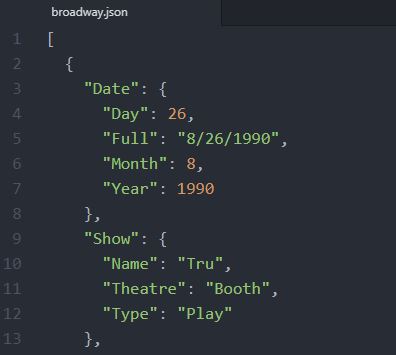
JSON example file
An example JSON file

Read more

Your Guide to Reading Excel (xlsx) Files in Python

reading xlsx files in python

Do you ever spend hours sifting through Excel files, trying to make sense of the data? Openpyxl can help! In this tutorial, we’ve covered everything you need to know about using Openpyxl in Python to read and manipulate Excel files. You will learn to import the necessary modules, set the file path, and read the file and its active sheet. We’ll also dive deeper into manipulating the sheet, including creating a dictionary from an Excel file and reading multiple Excel files in a directory.

By mastering these techniques, you can streamline your data processing workflow and gain valuable insights from your data in a fraction of the time. Whether you are a data analyst or someone looking to make sense of complex data sets, Openpyxl is a powerful tool to help you achieve your goals. So, grab your favorite beverage, fire up your Python IDE, and let’s get started!