Spyder is the best Python IDE I have used for data analysis, scientific computing, and general Python development. I’ve been using it for years, and despite trying alternatives such as PyCharm, VS Code, and Rodeo, I keep coming back to Spyder. In this post, I’ll explain why it’s my preferred Python IDE, walk through the features I use most often, show you how to install Spyder on Ubuntu, and briefly compare it with Rodeo.
When I first started programming in Python, I used IDLE, the editor included with the standard Python installation. It worked well enough for learning the language, but I eventually wanted something that made data analysis and larger projects easier to manage. Around the same time I started learning R, I discovered RStudio. Its workflow immediately appealed to me and made me look for a Python IDE with a similar focus on interactive programming and data analysis. That’s when I found Spyder.
There are plenty of Python IDEs to choose from. Before switching to Spyder, I used Ninja-IDE for a while, but I found Spyder better suited to scientific programming and data analysis. The name Spyder stands for Scientific PYthon Development EnviRonment, reflecting its focus on scientific computing. Its interface is often compared to MATLAB, while the layout and workflow will also feel familiar to anyone who has used RStudio.
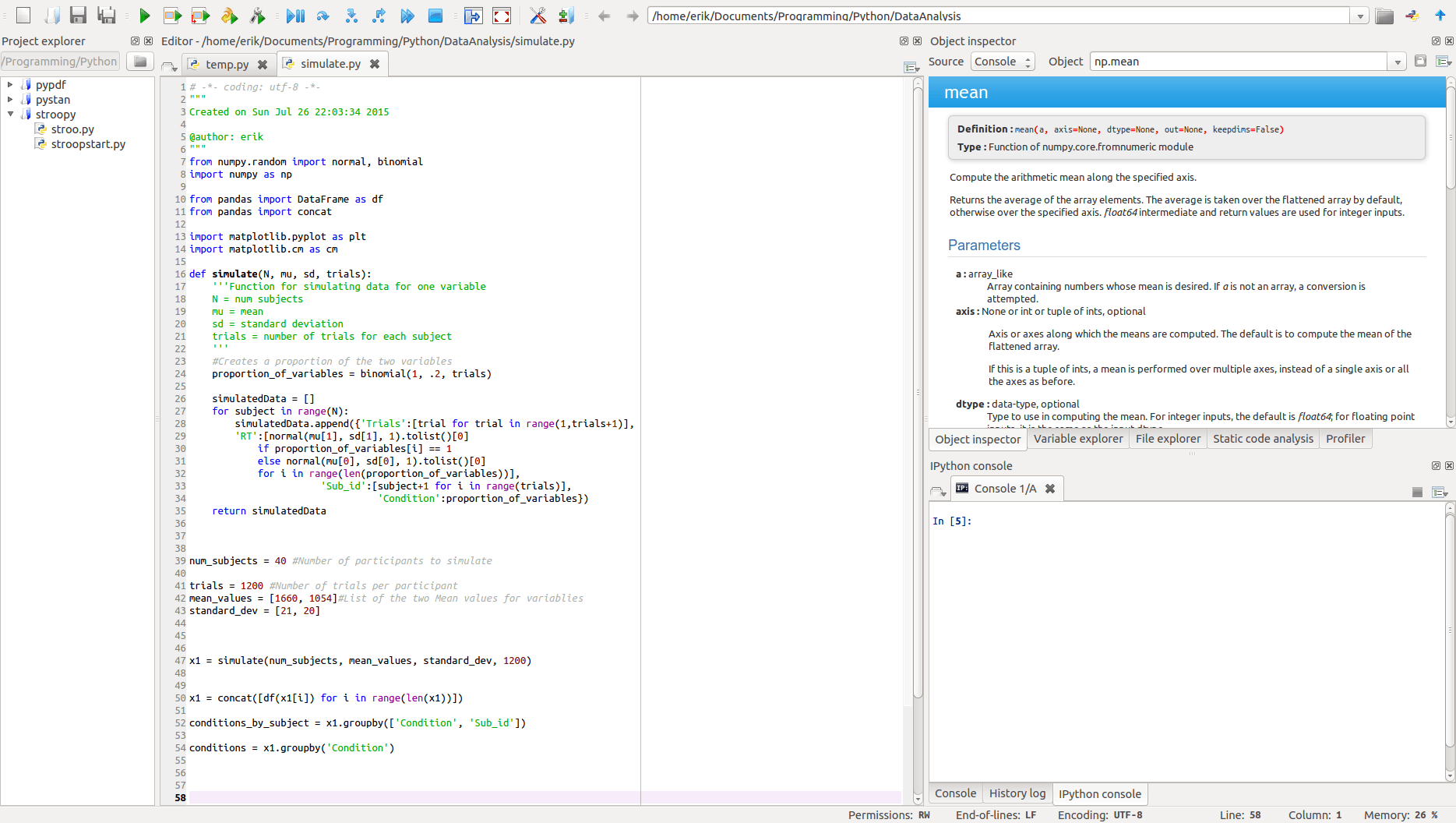
With the right IDE, Python is a good free alternative to MATLAB for many tasks. I haven’t used MATLAB since 2011 and don’t even have it installed anymore. A proper comparison between Spyder and MATLAB is a topic for another post.
Why Do I Think Spyder Is the Best Python IDE?
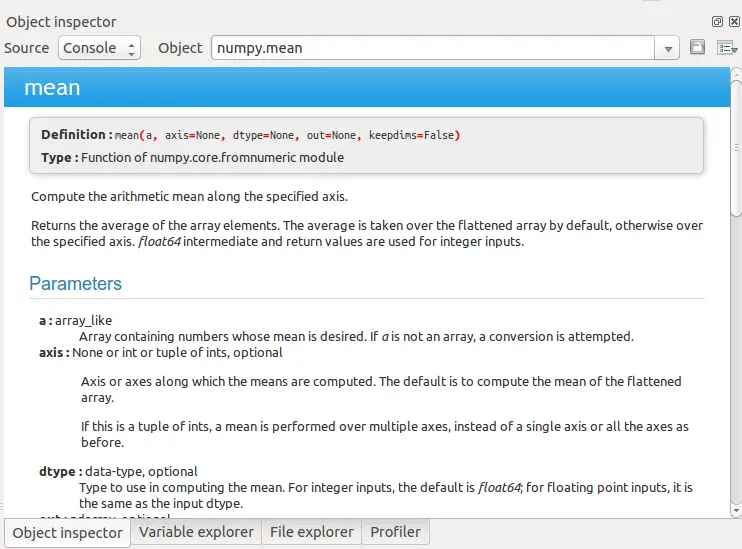
One of the reasons I keep coming back to Spyder is its built-in documentation tools. I’ve always liked how easy it is to look up functions and packages in RStudio, and Spyder offers a similar workflow. The Object Inspector (shown below) lets you quickly view documentation for classes, functions, and modules without leaving the IDE. When you’re working with unfamiliar libraries or can’t quite remember a function’s arguments, it’s a feature you’ll probably use every day.
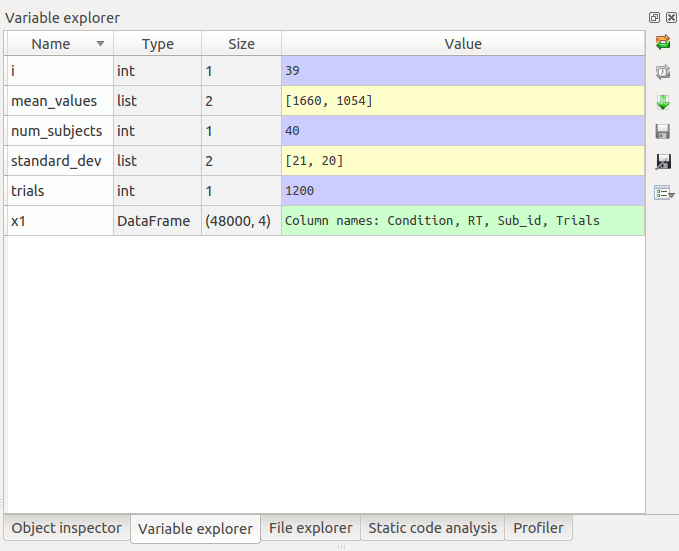
Another feature I use frequently is the Variable Explorer. It provides an overview of objects currently in memory, making it easy to inspect data frames, arrays, dictionaries, and other variables as you work. Spyder also integrates code analysis tools such as Pylint or Pyflakes , making it easy to spot potential errors and improve your code as you work.
Spyder includes plenty of other features that make it well suited for scientific programming and data analysis. For example, it offers:
- syntax highlighting for Python, C/C++, and Fortran
- breakpoints and conditional breakpoints for debugging
- integrated tools for running and debugging Python scripts
- both IPython and standard Python consoles
These are some of the reasons I’ve continued using Spyder over the years. The short video below gives a quick overview of several of these features..
How to install Spyder
Here are a couple of methods for installing Spyder on Ubuntu:
Pip
sudo pip install spyderCode language: Bash (bash)apt-get
sudo apt-get install spyder
Code language: Bash (bash)
Spyder vs. Rodeo
Before wrapping up, it’s worth taking a quick look at Rodeo, another Python IDE. At first glance, its interface looks very similar to RStudio (see the screenshot below).
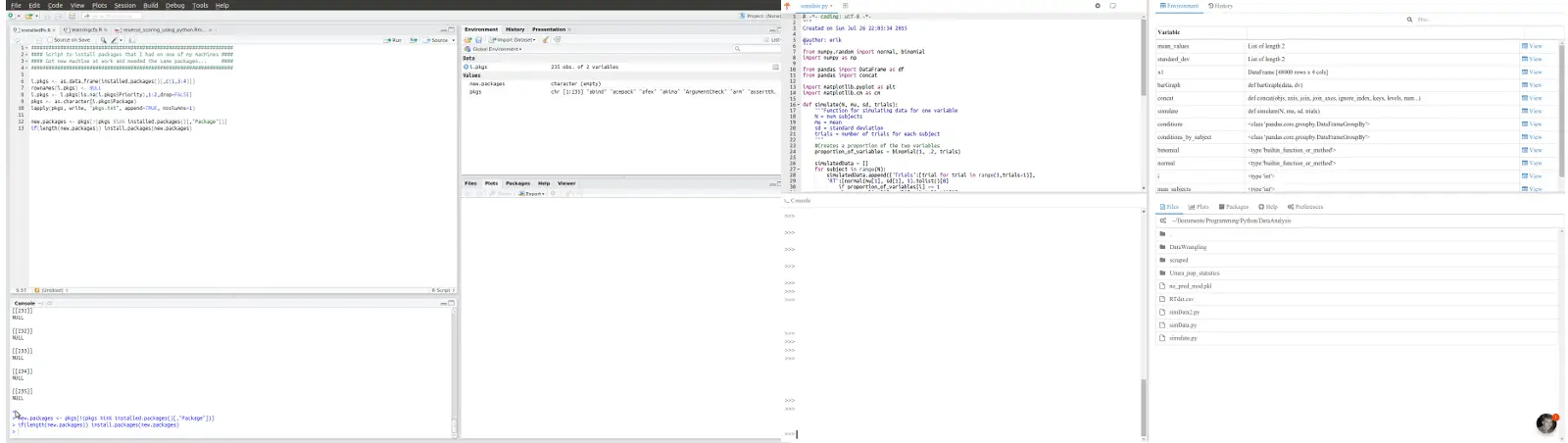
Rodeo takes a more lightweight approach than Spyder, with fewer built-in tools and a simpler interface. Like Spyder, it lets you access documentation for imported modules directly from the console using help(). If you prefer a minimal development environment, Rodeo may be a good choice. I still prefer Spyder because it includes more of the tools I use for data analysis and scientific programming in a single IDE.
Spyder is a great IDE indeed! However, 4 of 5 people who had previously been using Spyder decided to stick with PyCharm after I introduced them to that IDE. It is extremely powerful (and therefore has a somewhat steep learning curve at the beginning), and even supports remote debugging, which is essential e.g. in multi-processing apps (such as when debugging an experimental script for PsychoPy that uses ioHub for device polling). Check out https://www.jetbrains.com/pycharm, and be sure to get the Professional edition, for which you can acquire a free license for academic use.
As to how to use the remote debugger, I compiled a small tutorial a while ago:
https://github.com/hoechenberger/iohub-debug-pycharm
Cool. Gonna check it out.
By the way, saw on your CV that you’ve been attending/presenting at International Multisensory Research Forum. Are you going to China this year also? I am going to present a (pilot) study.
Yep, I’ll be there! Would be great to meet you! I signed up for a poster presentation of some visual-olfactory RT data 🙂
I really enjoy Spyder. A feature I wish existed is to be able to edit variables directly in the variable explorer. The end goal I think of is to have a spreadsheet interface to define input variables. The limitation of doing this in code comes about when you want to define a number of scenarios for each input (like a table where rows are inputs and columns are scenarios for each input). One could do that with a dictionary of lists but this is not the best for reading and editing safely. You can also use excel but then you have a disconnect with Spyder, and you don’t have highlighting of each input (to see where it is used in the code). Have you ever found this to be an issue?
Hey, Kieran.
Thanks for your comment. No, I have not found that being an issue. When I need to change a variable I use the iPython or Python interpreter. I have not worked with any IDEs that offers changing variables through the interface.
I agree that Spyder is the best Python IDE for scientific use. I would also argue that Spyder is the best Python IDE for programming, period? Why is Spyder the best IDE? Well, I think you are straight on point; the variable explorer is so great. When testing your Python scripts its invaluable to be able to check whats in your different variables. And for MATLAB users looking for a better, free, AND open source alternative to MATLAB, Spyder is the best. It’s quite similar to the MATLAB environment. And for the R stats users? Yes, Rodeo looks like RStudio (it’s a clone, right!) but I think there are more power in Spyder (best Python IDE for R users? ;-)).
There are two features that are missing from spyder and made me move to pycharm (at least for now):
1) No version control support. After I got used to the github integration of rStudio I can’t live without it
2) abysmal support for custom keybindings. Using editor without emacs keybindings is just painful.
btw, your research interests look very interesting 🙂
Hey Ilkka.
1) You are right, if you prefer to work with git within the IDE, PyCharm may be a better choice. Especially if you are used to this workflow within RStudio. However, after a while I started to use git in the terminal (mainly because branching was easier this way) so for me it’s not really a problem.
2) I don’t really have an opinion regarding this. You’re probably right. 😉
I am actually writing up a blog post (will probably publish it this weekend) in which I compare Spyder and PyCharm. This because I actually moved to using PyCharm when coding applications (and Jupyter Notebooks for data visualization and analysis).
Had a look at your Google Scholar profile. You’re involved in some interesting stuff. What are your main research interests?
Terminal is probably the best way to use git, however, I’m currently working on windows and the windows command prompt is what it is…
Very interesting to see your comparison on Spyder/PyCharm, I’m kind of new to python programming and am still sampling the different options (thats how I ended up in this page).
My main research interests are related to physiological computing: using physiological signals such as heart rate, skin conductance and “brainwaves” in (usually) real time to adapt computer applications in one way or another.
Even after a year using Spider, I don’t like it. Compared with Matlab’s GUI it feels soft and uncertain. Especially the lack of integration of the debugger costs tons of wasted hours compared to Matlab’s debugger. I’m still looking for something more stable and rocksolid, but haven’t succeeded yet. I think of picking up Eclipse, but had to drop it in the past because of it’s mere complexity. I guess that some crowd funding it necessary to make spider really stand out.
Hey Theo,
I like Spyder (as you may understand from the post ;-)). Then again, I did not like MATLAB that much at all. Maybe I did not really get to know the interface of MATLAB well enough to think that Spyder is much worse. I have tried to use Eclipse but the learning curve was to steep for me (at least at that time). It is supposed to be really powerful once you get to know it, I’ve heard.
Thanks for your comment. I hope you find a better IDE, comparable to MATLAB, because Python is a great programming language!
Hey, I just started python (don’t have any mention worthy programming expereience before)
and in our course we started to use Jupyter Lab (which feels great apart from beeing buggy and sometimes not doing anything even tho the programm is not too complicated. –> so i guess it is unsuable for complex tasks?)
Today I wannted to run my first programm on spyder py3.7 (it is the IDE installed on the Pc’s in the uni library)
. and it iskinda annoying.
I just want to run a 3 line for loop and it is way less intuitive than jupyter lab.
it took me like 30 min to figure out basic functions.
Mybe it is good for experienced users but not the best for beginners.
Hey Tristan. Thank you for your comment. Maybe you’re right. I was quite comfortable using Python before I started using an IDE. Right now, I am mainly using Jupyter Notebooks, to be honest.
Best,
Erik
I spent one day to learn PyCharm, I think I know most of them – all most true as I still need to browse its guide – for example the annoy Python indent – user need to click editor setting to keep it.
Many years ago I tried Eclipse too complicated, I used to use SourceInsight, SlickEdit, Visual studio. Tried a bit on VS code high expectation, yet updated too often with bugs, tried Anaconda – too heavy.
Basically I want a tool, not to play with tool – keep to learn or try to fix bug.
Spyder is nice to have variable explorer, it would be to be global. Pycharm will show context var besides source line, also in watch area and you can click … to expand a list.
Unfortunately, Sypder doesn’t know how to run pySimpleGUI code but pycharm does. so how can it be the best?