How to Convert a NumPy Array to Pandas Dataframe: 3 Examples

In this Pandas tutorial, we are going to learn how to convert a NumPy array to a DataFrame object. Now, you may already know that it is possible to create a dataframe in a range of different ways. For example, it is possible to create a Pandas dataframe from a dictionary. 

As Pandas dataframe objects already are 2-dimensional data structures, it is of course relatively easy to create a dataframe from a 2-dimensional array. Much like when converting a dictionary, to convert a NumPy array, we use the pd.DataFrame() constructor: 
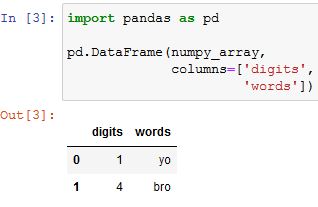
how to convert numpy array to pandas dataframe code example

Read more

Your Guide to Reading Excel (xlsx) Files in Python

reading xlsx files in python

Do you ever spend hours sifting through Excel files, trying to make sense of the data? Openpyxl can help! In this tutorial, we’ve covered everything you need to know about using Openpyxl in Python to read and manipulate Excel files. You will learn to import the necessary modules, set the file path, and read the file and its active sheet. We’ll also dive deeper into manipulating the sheet, including creating a dictionary from an Excel file and reading multiple Excel files in a directory.

By mastering these techniques, you can streamline your data processing workflow and gain valuable insights from your data in a fraction of the time. Whether you are a data analyst or someone looking to make sense of complex data sets, Openpyxl is a powerful tool to help you achieve your goals. So, grab your favorite beverage, fire up your Python IDE, and let’s get started!