In this tutorial, we will learn how to create dummy variables in R. Now, creating dummy/indicator variables can be carried out in many ways. For example, we can write code using the ifelse() function, we can install the R-package fastDummies, and we can work with other packages and functions (e.g. model.matrix). In this post, however, we will use the ifelse() function and the fastDummies package (i.e., dummy_cols() function). First, we will explain why we may need to dummy code some of our variables.

Outline
In the first section of this post, you will learn when we need to dummy code our categorical variables. This section is followed by a section outlining what you need to have installed to follow this post. For example, this section will show you how to install packages that you can use to create dummy variables in R. Now, this is followed by three answers to frequently asked questions concerning dummy coding, both in general but also in R. Note, the answers will also give you the knowledge to create indicator variables.
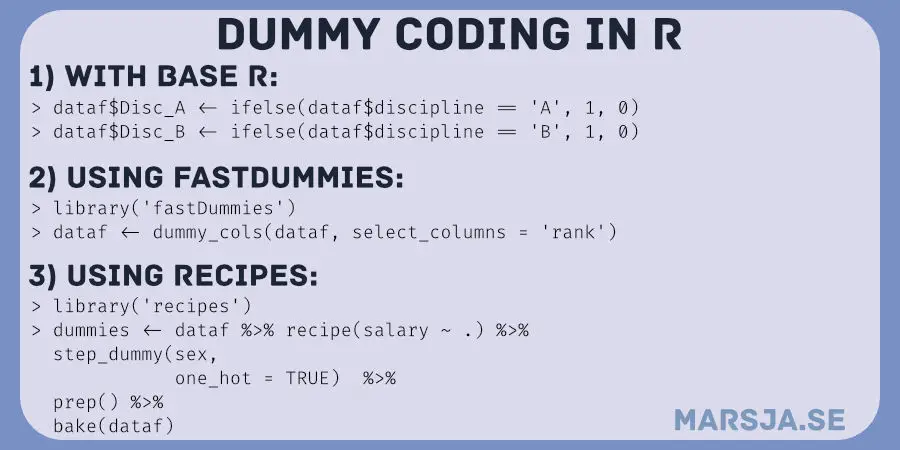
Finally, we are going to get into the different methods that we can use for dummy coding in R. First, we will use the ifelse() function, and you will learn how to create dummy variables in two simple steps. Second, we will use the fastDummies package, and you will learn three simple steps for dummy coding. The fastDummies package is also much easier to work with when you, e.g., want to make indicator variables from multiple columns. Therefore, there will be a section covering this and removing columns we no longer need. In the following section, we will also look at how to use the recipes package for creating dummy variables in R. We will also cover dummy coding based on multiple conditions. Before concluding the post, we will also learn about some other available options.